tamtam — apps that write themselves, and the part of me that's fine with that
ai
claude
claude-code
agents
nextjs
sqlite
automation
devtools
dashboard
I have twenty projects in my workspace. At any given moment, roughly a third of them have uncommitted changes I’ve forgotten about, two are red on CI because of something trivial, one has a scheduled daily review I keep meaning to run, and at least one wants a dependency bump that would take Claude forty seconds to do. The problem isn’t Claude Code — Claude Code is great. The problem is that I have to cd into each repo, check the state, decide what to do, and then type the prompt. Doing that across twenty projects is a loop I was losing every single day. So I built tamtam — a web dashboard that sits in front of Claude CLI and drives it for me across the whole workspace.
Six days in, tamtam has been reviewing and improving itself on a 24-hour cron. It edits its own code, opens its own commits, updates its own prompts when they don’t work, and pings me when something needs a human look. My role has quietly narrowed to two things: handing over tokens and pointing a direction. Some will call this amazing. Some will call it app slop. Honestly, both are correct. This post is about what that feels like in practice, and the dashboard I built so I can live inside it without losing the thread.
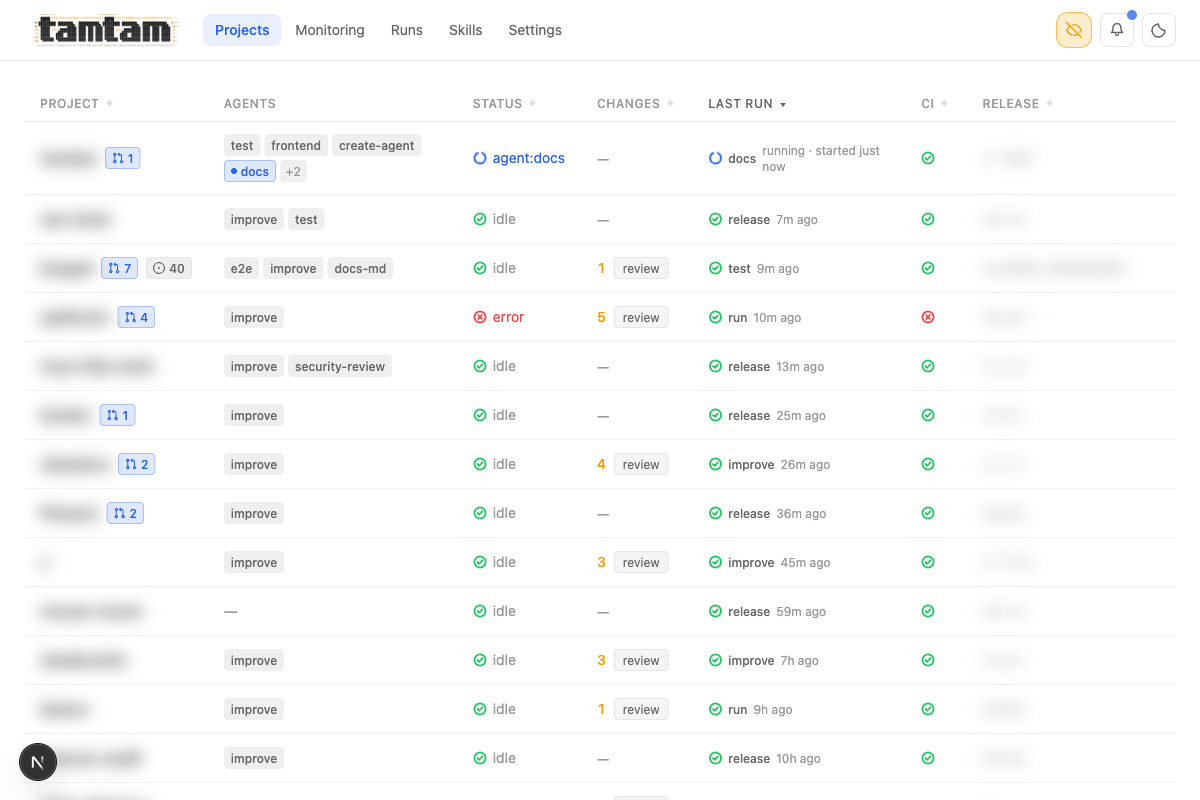 Projects view, privacy mode on (eye icon top-right blurs project names, release tags, and anything else I don’t want in a screenshot). One table, the whole workspace. Each row: idle/running/error status, open-PR count, uncommitted changes (clickable “review” button), last run with kind + age, CI status, current release tag, and per-project action pills. The
 test, frontend, create-agent, docs, improve etc. pills are the agents attached to each project.
The actual problem
Claude Code is a CLI. That’s its strength — it composes with everything. But a CLI forces you into a single-project, single-thread mental model. You open a terminal, you cd somewhere, you do one thing. Meanwhile the real unit of work I have is “what’s going on across all my repos right now”. I wanted to see that, click a thing, and have Claude go off and fix it without me needing to remember which repo it was in or what the test command is or whether I’d already reviewed the changes.
The second thing I wanted was scheduling. “Every 24 hours, go into each repo, read the last day of commits, and propose one concrete improvement.” I can write that as a cron + a shell script, sure — but then I have to also capture the output, make it browsable later, wire up notifications when it finishes, and deal with rerunning it when it fails. That’s the stuff a UI is genuinely good at.
What I built
Three primitives: skills, agents, runs — plus a monitoring page that ties them together.
A skill is a reusable block of instructions. You write it once (in the DB or as a SKILL.md file in the skills/ submodule) and reuse it anywhere.
An agent is project + model + prompt + [skills] + optional cron. When you run an agent, tamtam builds the final prompt, launches Claude CLI under PM2, and streams the output back into the browser token by token.
A run is what you get when an agent fires — a log, a status, an exit code, a button to rerun, and it shows up as the “last run” on the project page.
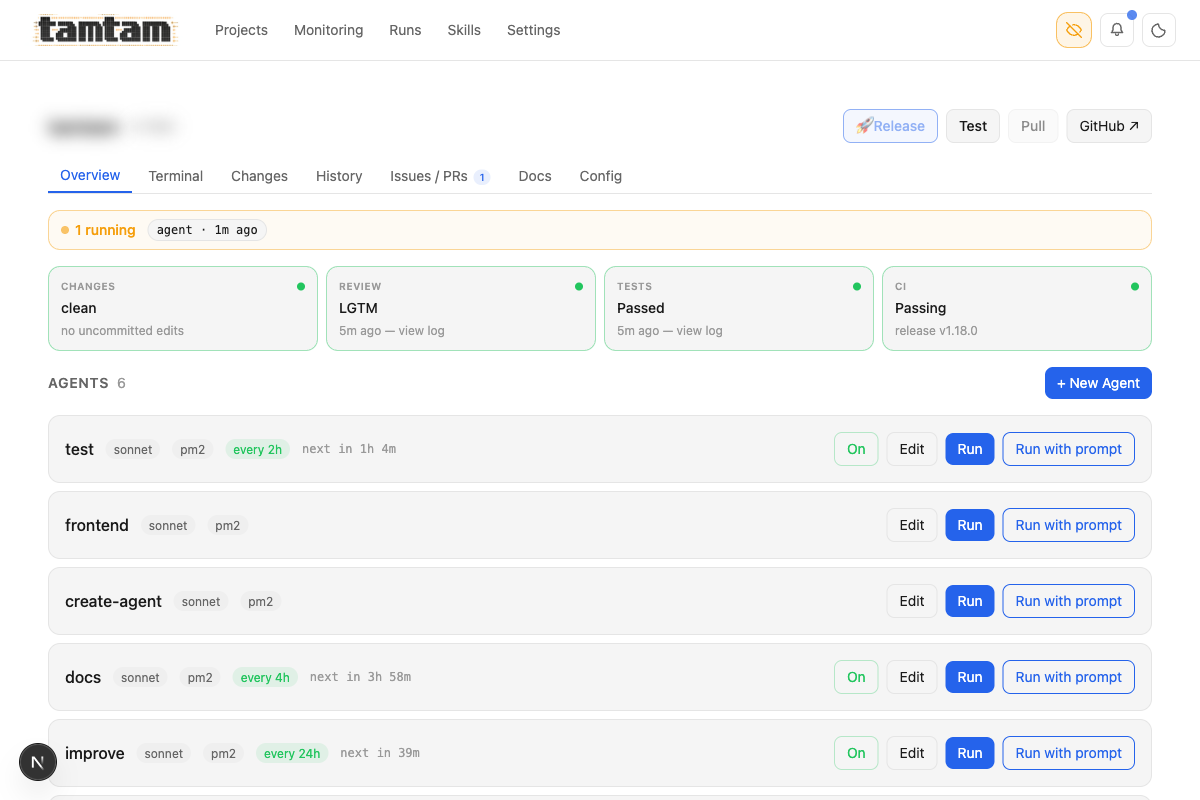 Project overview. Top strip is the ship pipeline as a dashboard — Changes / Review / Tests / CI, each a status card I can click to jump into the details. Below it, every agent attached to the project with its model, runner (
pm2), schedule, and a Run button. The “Recommended” section at the bottom is a one-click way to drop in common agents like security-review, dependency-check, ci-monitor, or the one that generated this very blog post.
Monitoring is the central place to see if everything is working: active runs, recent failures, scheduler health, CI status across projects, and unread notifications, all on one page. It’s the first thing I open in the morning.
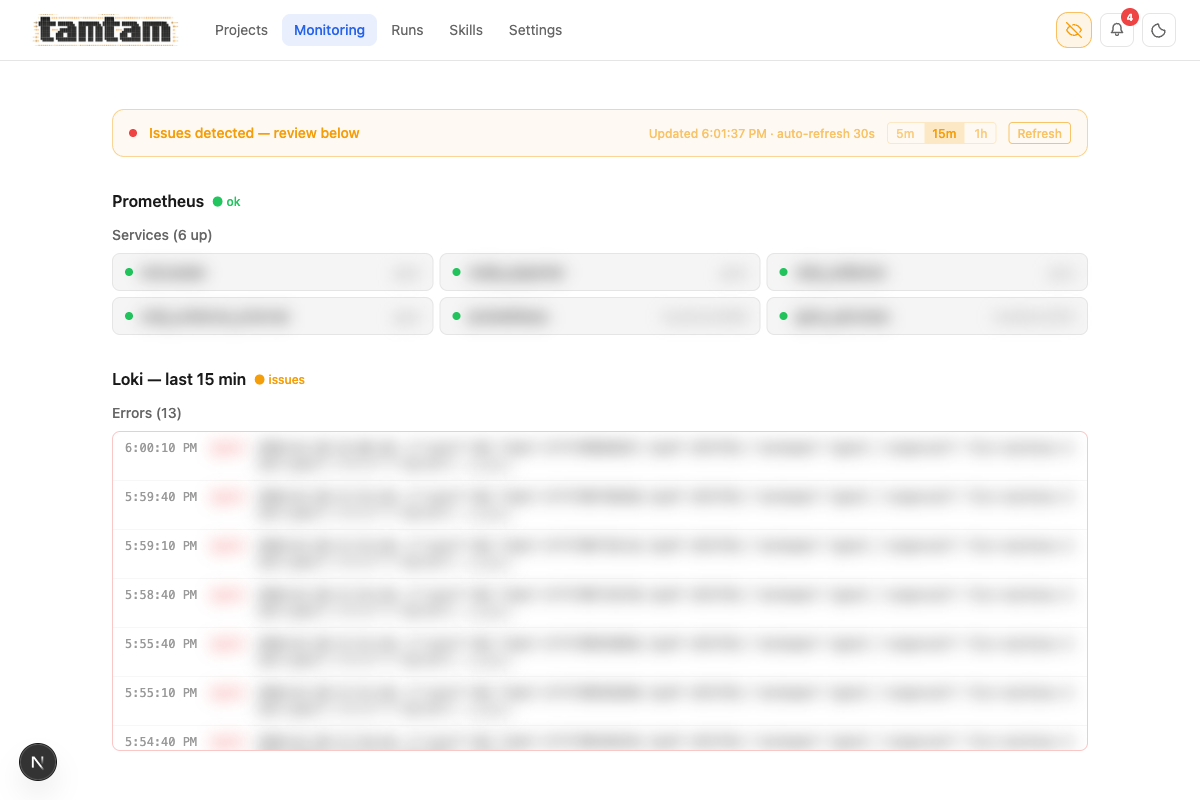 Monitoring page. Prometheus (“6 up”) and Loki last-15-min errors stream in with auto-refresh and 5m/15m/1h windows. When anything’s on fire across the infra the banner at the top goes orange — “Issues detected — review below” — so I see it without hunting for it.
That’s basically the whole mental model. Everything else in the UI — the ship/commit dialog, the CI-fix button, the test scheduler, the notification bell — is built on top of those primitives.
The part that’s actually weird
The dashboard is the boring half. The weird half is what the dashboard has turned me into.
Every agent in tamtam is a row in a SQLite table. Its prompt is a TEXT column. There is nothing — not the framework, not the DB, not the process model — stopping an agent from editing that column. So they do. The improve agent attached to tamtam has, more than once, rewritten the prompt of another agent to fix a flaky run, committed the change, and pushed it. The docs agent has updated CLAUDE.md — the file Claude reads at the start of every session — to document the conventions it just learned. The test agent adds test cases for bugs it reports. The ship flow fires the review agent, which reads its own diff, grades its own work, and then hands the result to Claude, who commits in a message Claude wrote, via a button that Claude-the-reviewer enabled. The loop closes on itself. I am not in most of it.
And yes — this is literally configurable. Every project has three checkboxes in its Config tab:
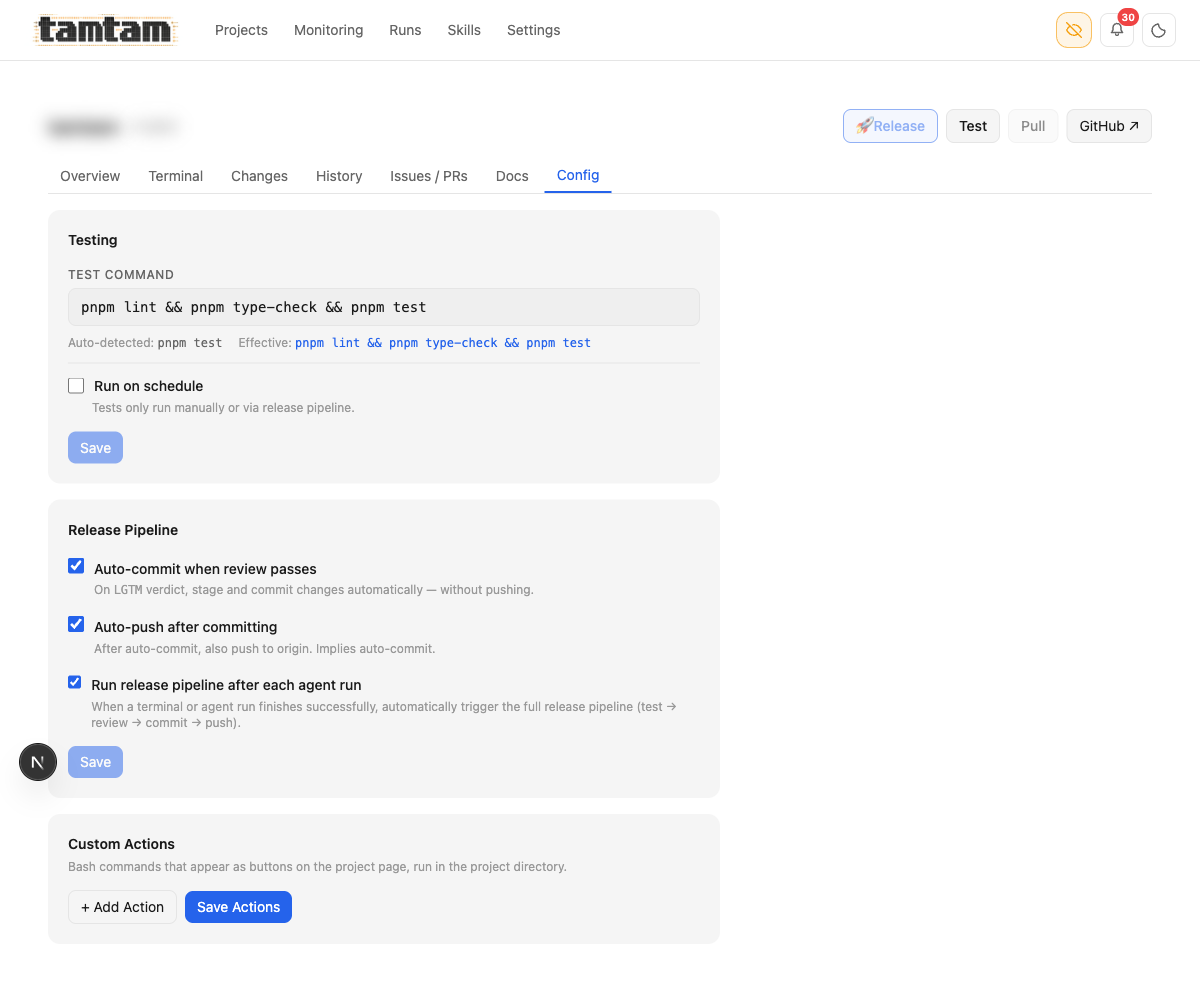 Project Config. Three checkboxes — “Auto-commit when review passes”, “Auto-push after committing”, “Run release pipeline after each agent run” — wire the whole self-writing loop. With all three ticked, a scheduled
 improve agent finishes at 3 AM, fires the test suite, fires the review agent, gets LGTM, commits with a Claude-written message, pushes to origin, and I wake up to a deploy notification. Below: “Custom Actions” — arbitrary bash buttons that show up on the project page.
What I am doing, all day, is pointing. “Improve that.” “Fix CI on this one.” “Run tests every two hours.” “Go read this issue and decide.” Twenty repos, a few dozen agents, a few scheduled cron fires per hour, and the human-shaped thing in the middle is a token budget and a finger. Some people will read that and see the dream; some will see the bleakest possible version of what software is becoming. I’ve been both people on the same day.
The reason I’m fine with it — today — is that the loop is visible and bounded. Every run is a row with a log I can open. Every prompt a file I can edit. Every diff a diff I can read. The scheduler is set to “Night only (20:00–05:59), weekdays only” so the loop runs while I sleep and pauses on weekends, which means I never have to compete with a flurry of agent commits during the workday. Only 14 of the 20 projects are enabled for scheduled runs at any given time — the rest are paused because I haven’t yet decided I trust the loop on them.
The failure mode of agent systems isn’t “they do wrong things”; it’s “they do wrong things invisibly.” Tamtam is a flashlight pointed at the loop. The moment I can’t see what an agent did, I don’t trust it. Building tamtam was, in part, building the exact shape of surveillance I need to let the loop run without becoming the thing I’d have called slop.
Ask me again in six months.
How it actually works
The core insight is that Claude CLI already has a streaming output mode, and PM2 is already really good at process supervision and log capture. So tamtam is mostly glue.
When you hit Run in the UI, this is the chain:
claude --print --output-format stream-json --include-partial-messages \
       --verbose --model sonnet --permission-mode acceptEdits
That gets wrapped in a tiny shell script, launched under PM2 with --no-autorestart, and its stdout lands in a log file. Then this happens on the server:
// app/api/streaming/[jobId]/route.ts
let watcher = watch(logPath, () => { checkFinished(); });

// Poll every 1s as a safety net — fs.watch can miss the finishedAt
// flip on some filesystems, especially when PM2 renames the log on rotation.
const poll = setInterval(() => { checkFinished(); }, 1000);
A fs.watch on the log file plus a 1s poll as a belt-and-suspenders safety net. Every time the log grows, tamtam parses the new NDJSON lines from Claude’s stream-json output into typed events (text, thinking, tool_use, tool_result, done) and pushes them out over SSE:
function sendParsedEvents(text: string) {
  const events = parseStreamLines(text);
  for (const event of events) {
    if (event.type === 'text') {
      controller.enqueue(encoder.encode(sseEncode(event.text)));
    } else if (event.type === 'thinking') {
      controller.enqueue(encoder.encode(sseEncode(event.text, 'thinking')));
    } else if (event.type === 'tool_use') {
      controller.enqueue(
        encoder.encode(sseEncode(JSON.stringify({ name: event.name, input: event.input }), 'tool_use'))
      );
    }
    // ...
  }
}
No WebSocket, no queue, no Redis, no background worker. The PM2 log is the queue. You can reconnect the browser, kill the tab, come back an hour later — the run is still going, the log is still being written, and you just reattach the SSE stream at the current offset. This is the single design decision I’m happiest with.
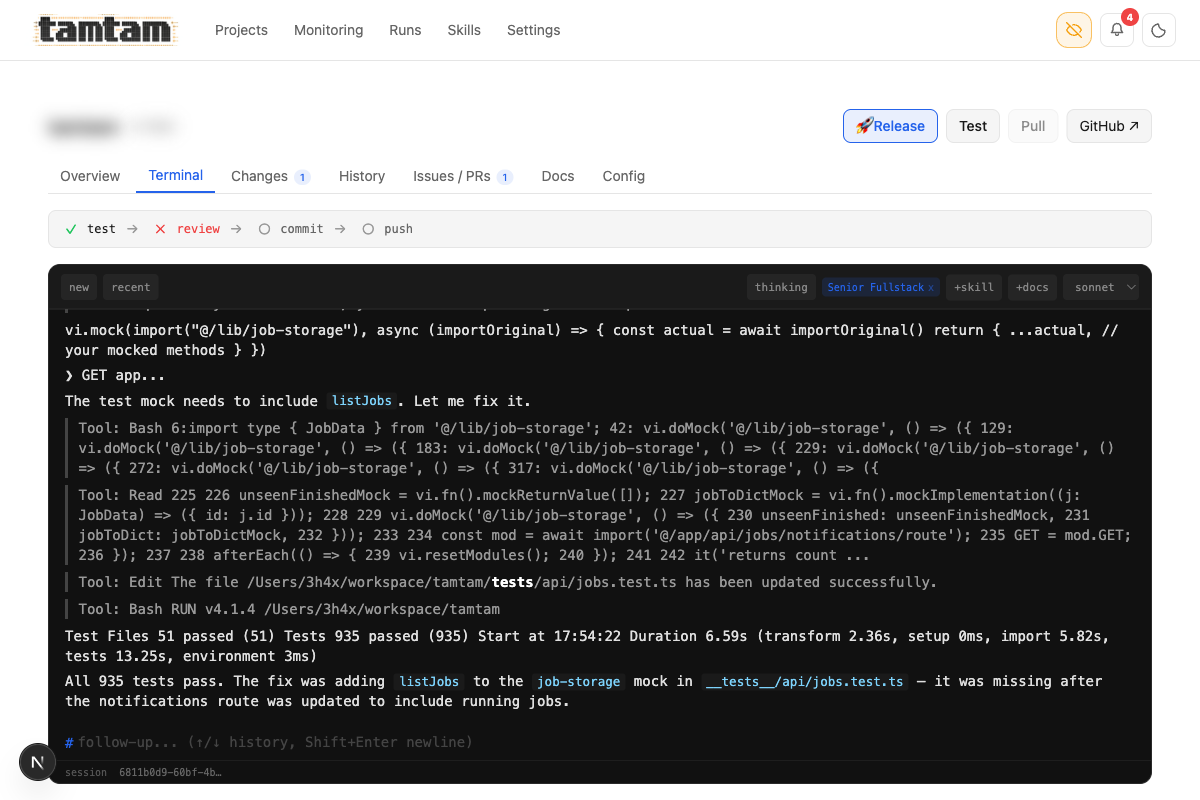 The per-project terminal mid-session — Claude fixing a missing
 listJobs mock in the jobs test file, with each Bash/Read/Edit tool call collapsed inline, ending in a green 935 passed in 6.59s. Pipeline bar at the top (test → review → commit → push) shows where the run is in the ship flow. Model picker (haiku/sonnet/opus) top-right, +skill / +docs pickers and session list top-left. Streams tokens as Claude produces them; sessions persist across reconnects.
Agents and the scheduler
Agents are stored in SQLite. The schema is intentionally boring:
CREATE TABLE agents (
  id TEXT PRIMARY KEY,
  name TEXT NOT NULL,
  project TEXT NOT NULL,
  skill_ids TEXT NOT NULL DEFAULT '[]',
  model TEXT NOT NULL DEFAULT 'sonnet',
  prompt TEXT NOT NULL DEFAULT '',   -- the actual command/instructions
  schedule TEXT,                     -- e.g. '24h', '4h', '2h', or a cron expr
  runner TEXT NOT NULL DEFAULT 'pm2',
  enabled INTEGER NOT NULL DEFAULT 1,
  created_at REAL NOT NULL,
  updated_at REAL NOT NULL
);
An agent is just “do stuff in this project” — the prompt can be anything: run Claude CLI, run tests, do a deploy, hit a webhook, kick off a migration. Because skills are composable and the prompt is free-form, adding a new kind of agent is almost always just INSERT INTO agents with a different prompt and skill set — no schema migration, no new code path.
When an agent has a schedule, tamtam uses PM2 — the same supervisor that runs tamtam itself and every Claude run — to fire it on time. The scheduled tick hits the same /api/agents/:id/run endpoint the “Run” button calls, so there’s exactly one code path for firing an agent — no “scheduled runs behave slightly differently” drift.
Here’s what my current set of agents looks like, pulled straight out of the DB (tamtam-20260417-2105.db):
improve  → tamtam       [sonnet]  every 24h
improve  → <repo-a>     [sonnet]  every 24h
improve  → <repo-b>     [sonnet]  every 4h
improve  → <repo-c>     [sonnet]  every 12h
improve  → <repo-d>     [sonnet]  every 24h
...                                (one improve agent per repo)
test     → tamtam       [sonnet]  every 2h
docs     → tamtam       [sonnet]  every 4h
e2e      → <repo-a>     [sonnet]  every 24h
frontend → tamtam       [sonnet]  (on-demand)
improve is a single prompt attached to a single “code review and propose improvements” skill, pointed at a different project in each row. Note the first line — improve → tamtam. Every 24 hours, tamtam opens its own source, reads the last day of commits, finds something worth fixing, and fixes it. Sometimes it’s a typo, sometimes a type, sometimes a whole subsystem. I come back to a run waiting for me to read, with a commit already on a branch or already shipped through the Ship (LGTM) flow. This post was generated by an agent too — the docs row. I edited it, but the first draft wasn’t mine.
The policies that keep the loop honest
Letting agents write themselves is reckless unless the rules they operate under are deliberate. Tamtam has one place for that: Settings → Behavior.
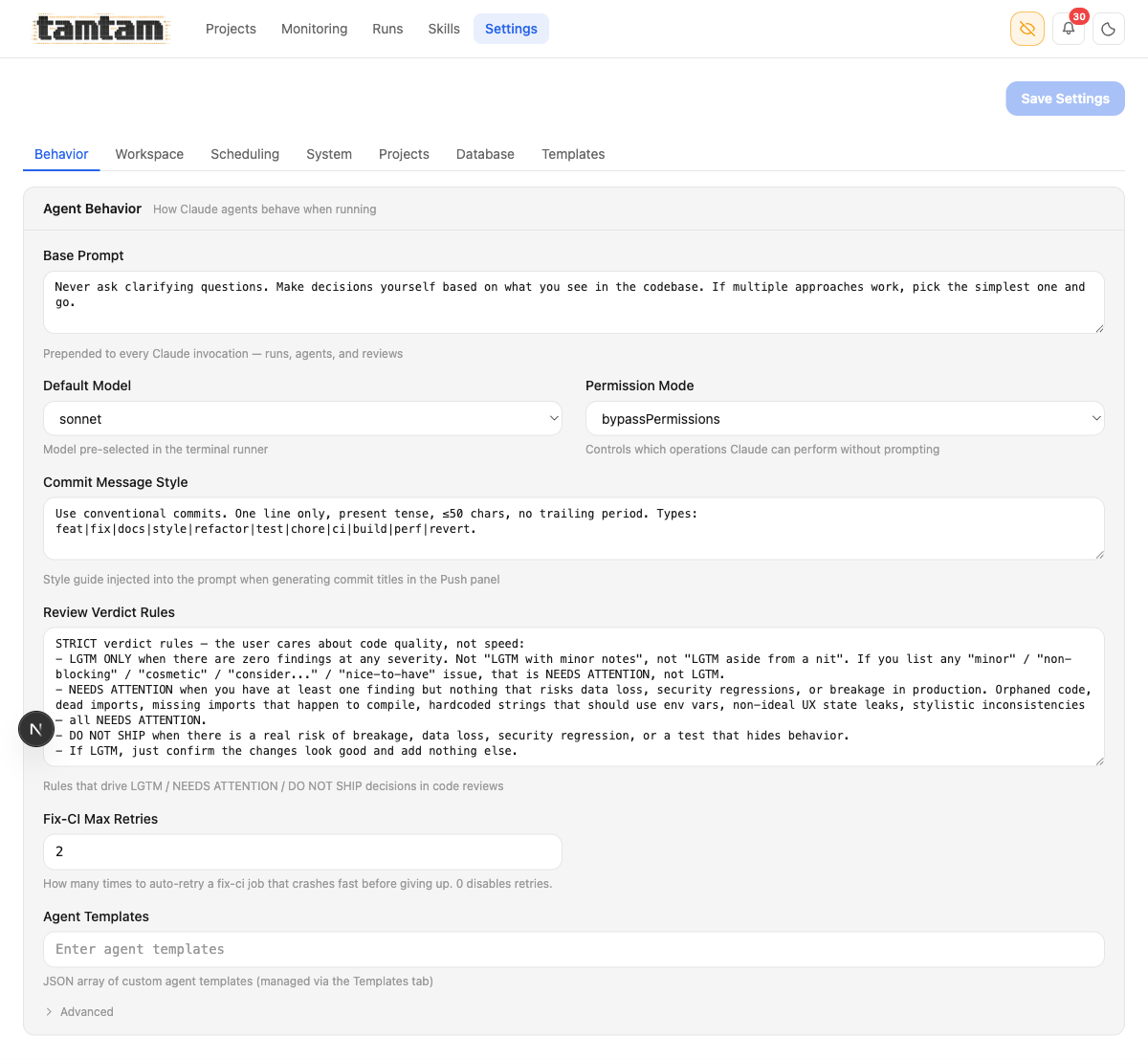 Agent behavior. The Base Prompt — “Never ask clarifying questions. Make decisions yourself based on what you see in the codebase. If multiple approaches work, pick the simplest one and go.” — is prepended to every Claude invocation tamtam makes. The Review Verdict Rules below it are the strict grading rubric used by the
 review agent: LGTM only with zero findings at any severity; any cosmetic/minor/nit-level issue forces NEEDS ATTENTION; real breakage risk is DO NOT SHIP. That rubric is the only thing standing between a Ship (LGTM) button and a push.
These two blobs of text matter more than anything else in the codebase. The base prompt shapes how every run thinks. The verdict rules are the judge that decides whether code leaves my laptop. They’re a global policy knob in a textarea — and because the agents that edit files can in principle edit those blobs too, the judge is tunable by the defendant. I’ve had to roll back a verdict-rule edit exactly once, and the mistake was mine (I accepted an improve run that relaxed “LGTM” without reading carefully). That’s the sharpest edge of this whole system. I keep the rules in a git-tracked file too, not just the DB, so I can see when they move.
The permission mode is bypassPermissions — tamtam runs Claude with every tool pre-approved. No “allow edit?” prompts, no “allow bash?” prompts. You do not want bypassPermissions on a machine that matters; it’s why this is a laptop tool bound to localhost, not a service.
The run history
I’ve been dogfooding this hard. Between April 15 and April 20 — six days of real use — the DB has 1,192 jobs across 20 projects:
| kind | count |
|---|---|
run |
488 |
test |
148 |
review |
140 |
agent:improve |
126 |
push |
75 |
release |
62 |
agent:test |
46 |
fix |
23 |
agent:docs-md |
18 |
agent:docs |
15 |
fix-ci |
10 |
agent:hi |
8 |
agent:e2e |
8 |
deploy |
7 |
| … (other) | 18 |
955 exited cleanly (exit=0), 166 were cancelled (exit=-1 — me hitting stop), and 71 genuinely failed. push, release, and fix-ci are new kinds that showed up once I started treating shipping as something tamtam does, not something I open a terminal for. The “failed” bucket is surprisingly small, and most of those are Claude CLI rate-limiting or session-conflict issues that tamtam now detects and surfaces with a useful message instead of a cryptic empty log:
if (!content.trim()) return 'log file empty — claude CLI exited without writing anything. ' +
  'Common causes: rate-limited (5-hour window), cold-start crash, or auth/session ' +
  'conflict with a concurrent run. Retrying usually works.';
That one error message saved me an embarrassing amount of confused log-spelunking.
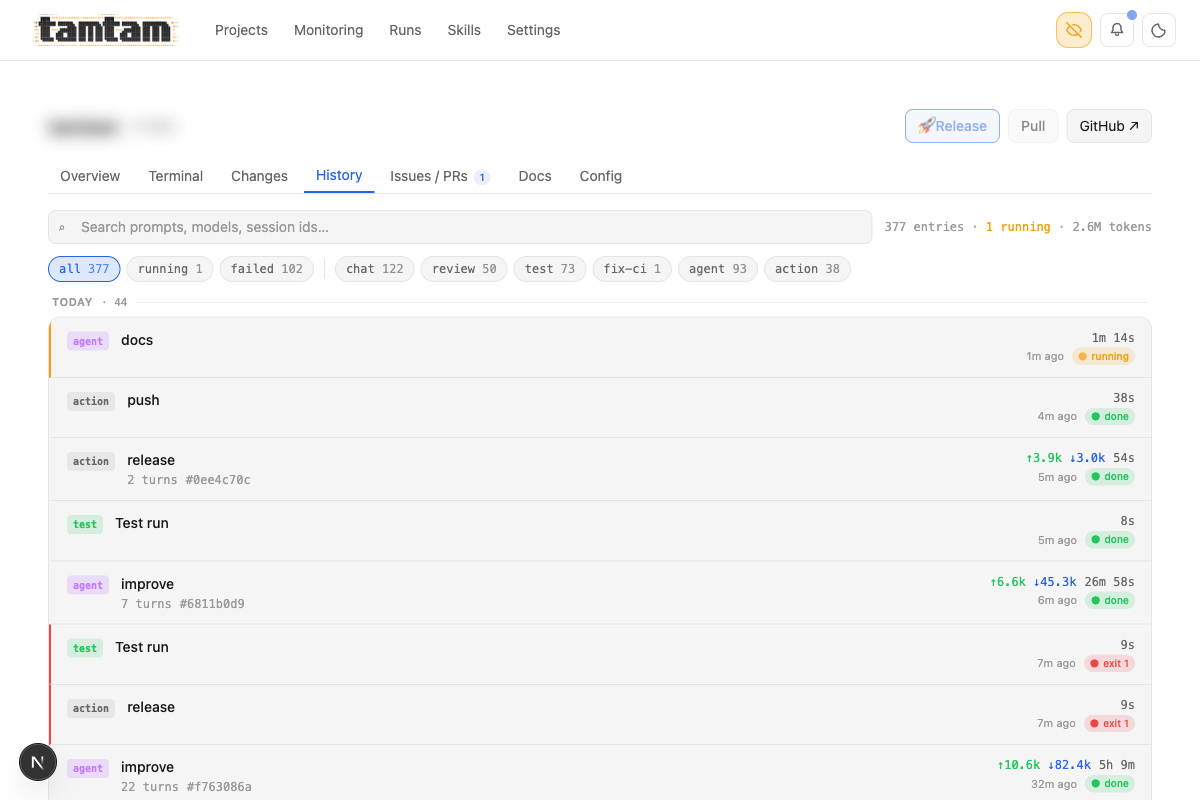 The per-project history page — 377 entries, 2.6M tokens, 1 running. Filterable by kind (chat, review, test, fix-ci, agent, action), grouped by day, with live-running jobs pinned to the top. Each row shows duration, ↑/↓ token counts, and exit status. Clicking opens the full log with syntax-highlighted tool calls.
Shipping — test, review, commit, push
The feature I was most skeptical about before building, and now use the most: the ship flow. A project with uncommitted changes gets a pipeline bar at the top of its terminal — test → review → commit → push — and each step is a button that turns green when it passes. Once review comes back LGTM, the top-right button switches from Ship (review) to Ship (LGTM) and the whole thing is one click to ship.
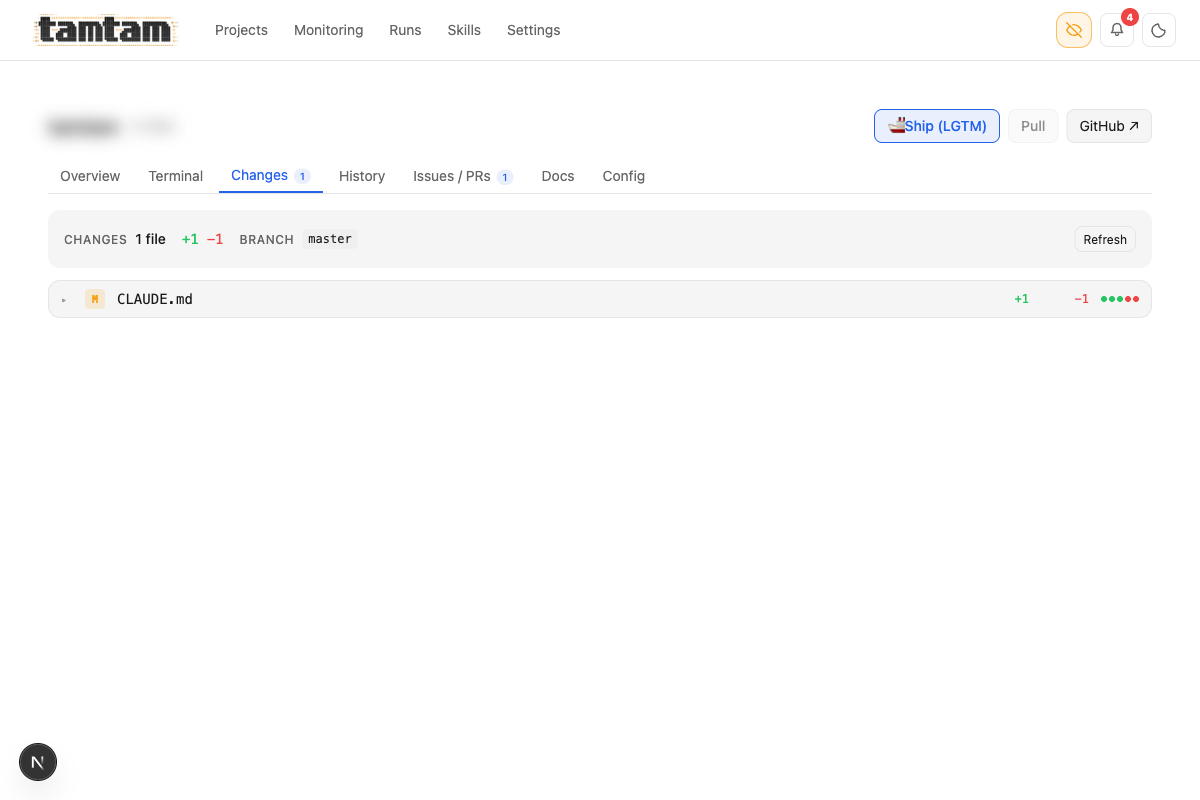 Changes tab. Shows uncommitted files with +/- counts and the branch they’d go to. Top-right
 Ship (LGTM) button is the one-click commit-and-push once review has cleared — Claude has already generated a commit message (or a handful) during the review step, so there’s nothing to type.
Behind that one button: tamtam runs the test command, fires a review agent to read the diff, asks Claude to propose commit messages, commits, and pushes. If the review verdict is NEEDS ATTENTION or DO NOT SHIP, the Ship button is disabled and the banner tells you why. If the tests fail, same thing. It’s the laziest possible git workflow for the ~80% of my commits I don’t need to hand-craft — and for the other 20% I just open a terminal and use git directly. The button doesn’t try to be a full git client; it does one thing, the “yes, ship it” path, really well.
Trade-offs and things that suck
It’s single-user. There’s no auth. It’s meant to run on your own laptop against your own workspace. I bind it to localhost and that’s it. If you wanted to deploy this for a team, you’d need to add real auth, real session isolation, per-user log scoping, and probably swap SQLite for something real. I have no plans to do that — it would change the entire design.
Streaming via log-file-tailing is gloriously pragmatic and slightly fragile. It works 99% of the time. The 1% where it doesn’t is usually a filesystem quirk (fs.watch missing events on network-mounted volumes) or PM2 rotating the log mid-run. The polling safety net catches most of that, but not all. The right answer is probably to pipe the claude stdout directly through a socket rather than a file, and I’ll probably migrate there eventually.
The agent “skill” composition is primitive. Skills are concatenated strings. There’s no templating, no variable interpolation, no conditional logic. I deliberately kept it dumb because the moment you add a template language you’ve written half a framework — and Claude is already a damn good template engine. If you want variable interpolation, ask the agent to do it.
The judge is tunable by the defendant. The Review Verdict Rules are a textarea. Agents can edit text. Nothing in the system prevents an improve run from relaxing the rubric, committing, and shipping through its own now-laxer judge. I mitigate this with git-tracked policy files, human eyeballs on any diff that touches Settings → Behavior, and the NEEDS ATTENTION-on-cosmetic-issues rule that makes almost any policy change trip the review. It’s a soft fence. If someone hostile had access to tamtam they could easily escape it. It keeps me honest; it wouldn’t keep an adversary honest.
I wrote this for me. The UX decisions — dark mode default, keyboard shortcuts nobody else would guess, zero onboarding — assume you already know what Claude CLI is and you’re comfortable with PM2 yelling at you in logs. That’s fine. It’s my tool.
When NOT to use this
Don’t use tamtam if:
- You only have one or two projects.
cd && claudeis already fine. - You need a multi-user team dashboard today. Right now tamtam is a laptop tool — team/multi-user support is on the roadmap but not here yet.
- You don’t use Claude Code as your primary driver. Tamtam’s whole value prop is “put a control plane over the CLI you already live in” — if you’re a Copilot person, this does nothing for you.
- You need to run this on production infra. The single-user, trust-the-local-fs design is a deliberate feature, not a stepping stone.
Use it if, like me, you’ve got a dozen or more repos, you’re running Claude CLI across all of them every day, and you’re tired of retyping the same prompts into the same three terminals. It turns “I’ll get to that later” into “oh, it already ran, let me skim the result”. Which, for me, has been the actual unlock.
Stack summary, because someone will ask
- Next.js 16 App Router, frontend and backend in one process
- SQLite via better-sqlite3 in WAL mode, schema through Drizzle ORM
- Tailwind CSS v4
- PM2 for process supervision — both for the tamtam dev server and for each spawned Claude run
- SSE for log streaming (not WebSocket — one-way is all I need)
- PM2 for scheduling as well — same supervisor, one code path for runs and scheduled fires
- Tests: vitest for units, Playwright for e2e
- ~24k lines of TypeScript as of this writing
No Redis, no queue, no cloud. Runs in about 80 MB of RAM. Binds to localhost:1337 via docker compose up (or pnpm dev if you really want it bare-metal). Data lives in data/db/tamtam.db next to the code. That’s it. The whole thing is the same “one database, one binary, one port” ethos I default to for everything I run on my own infra.
It’s open source: github.com/3h4x/tamtam. Clone it, docker compose up, point at your own workspace. The workspace-specific bits are in data/db/tamtam.db (gitignored) so a fresh clone starts empty; your projects get discovered the first time you set a workspace path in Settings. If you’ve been thinking about putting a UI over Claude Code for your own use, build one — or start here. It’s a week of work from scratch, and either way it changes how you work with the CLI permanently.
3h4x