tamtam, five days later — self-improving agents, a CTO in a textarea, and a release pipeline that closes its own PRs
ai
claude
claude-code
agents
nextjs
sqlite
automation
devtools
dashboard
ci-cd
Five days ago I posted about tamtam — a dashboard that drives Claude CLI across my workspace. Since then I’ve shipped 79 commits on top of it. The original post described a tool that could run the loop. What’s in master tonight is a tool that treats the loop as a first-class feature: agents that rewrite their own prompts on a schedule, a release pipeline that opens and merges its own PRs, a CTO skill that stops me from shipping busywork, a stats page that tells me when I’m burning tokens on nothing, and a pile of smaller things that make the whole thing feel less like a demo and more like an appliance.
This post is the delta. Same tool, five days older, behaving like a different tool in a few places that matter.
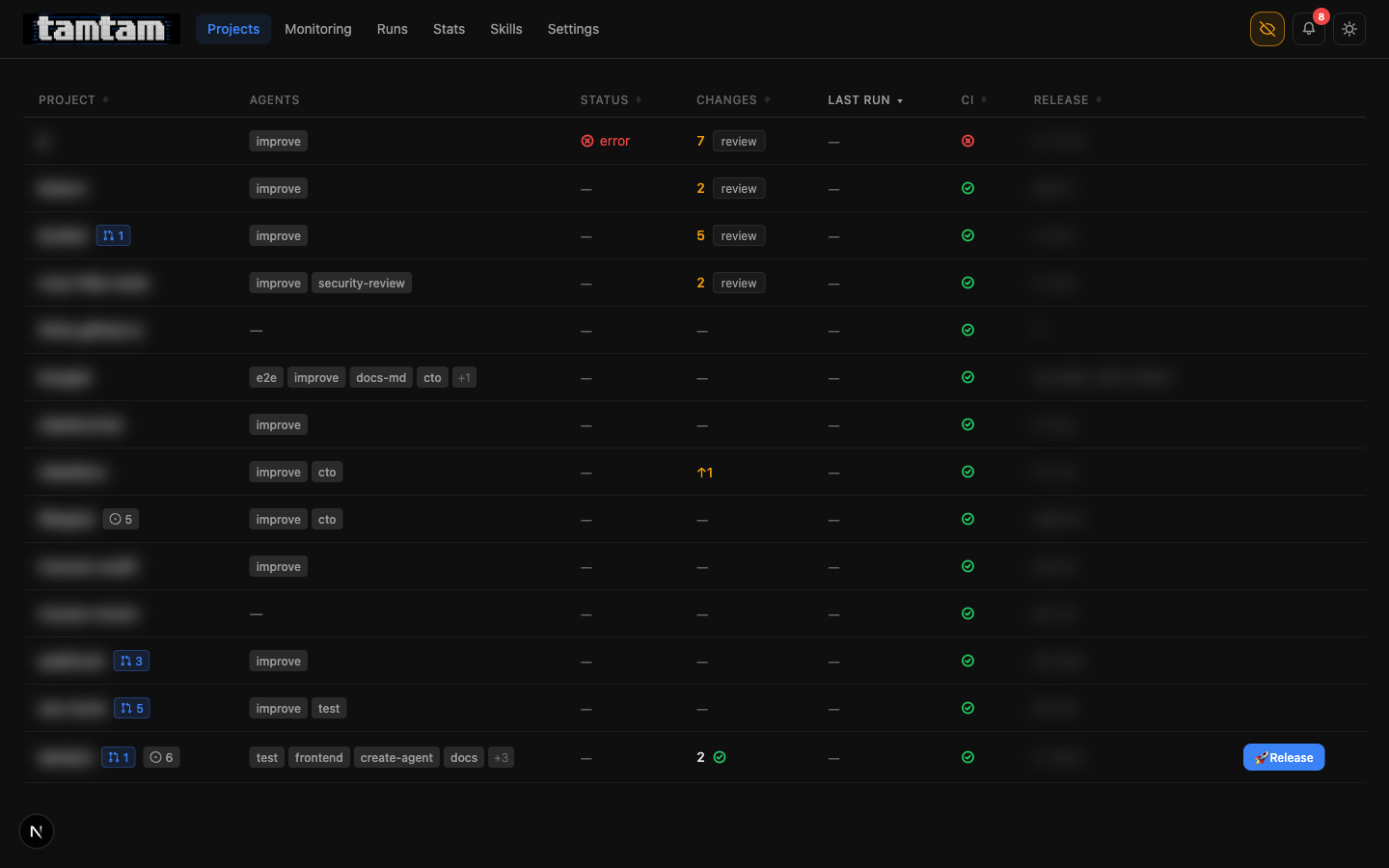 Projects dashboard, privacy mode on. Compared to the first post, the per-row controls are denser: PR count badges on the project name, issue-count pills (
◐ 5, ◐ 6), a proper Release button appears directly in the table on any project with uncommitted changes, and the review column is now clickable to jump straight into the diff. One glance at one page and I know what to touch.
What actually changed
Five things moved the needle enough to talk about. The rest is polish, tests, and bugfixes.
- PR Workflow mode — tamtam can now ship via pull request instead of direct-to-master, including opening the PR, writing its own description, watching the CI checks, and merging itself when green.
- Self-improving agents — there is a built-in skill called
self-improvewhose only job is to read the agents attached to a project and rewrite their prompts. Pointed at tamtam itself, it’s already done this twice while I was asleep. - A CTO skill — a recommended agent whose job is to read the repo, figure out what’s actually important, and file prioritised GitHub issues. The opposite of “find me a typo to fix”.
- Stats page — token spend and estimated cost, per project, over a window. First time I’ve looked at it and actually understood where my money goes.
- Release pipeline as grouped runs —
releaseruns now render as a parent row withtest → review → commit → pushchildren inline, so the history page stops being a wall of noise.
PR Workflow — the pipeline grew two more steps
The original pipeline was test → review → fix → commit → push. Fine for my own repos where I’m happy to live on master. Not fine the moment the project has a CODEOWNERS file, a branch protection rule, or a collaborator. So there’s now a second pipeline mode, selected per project in Config:
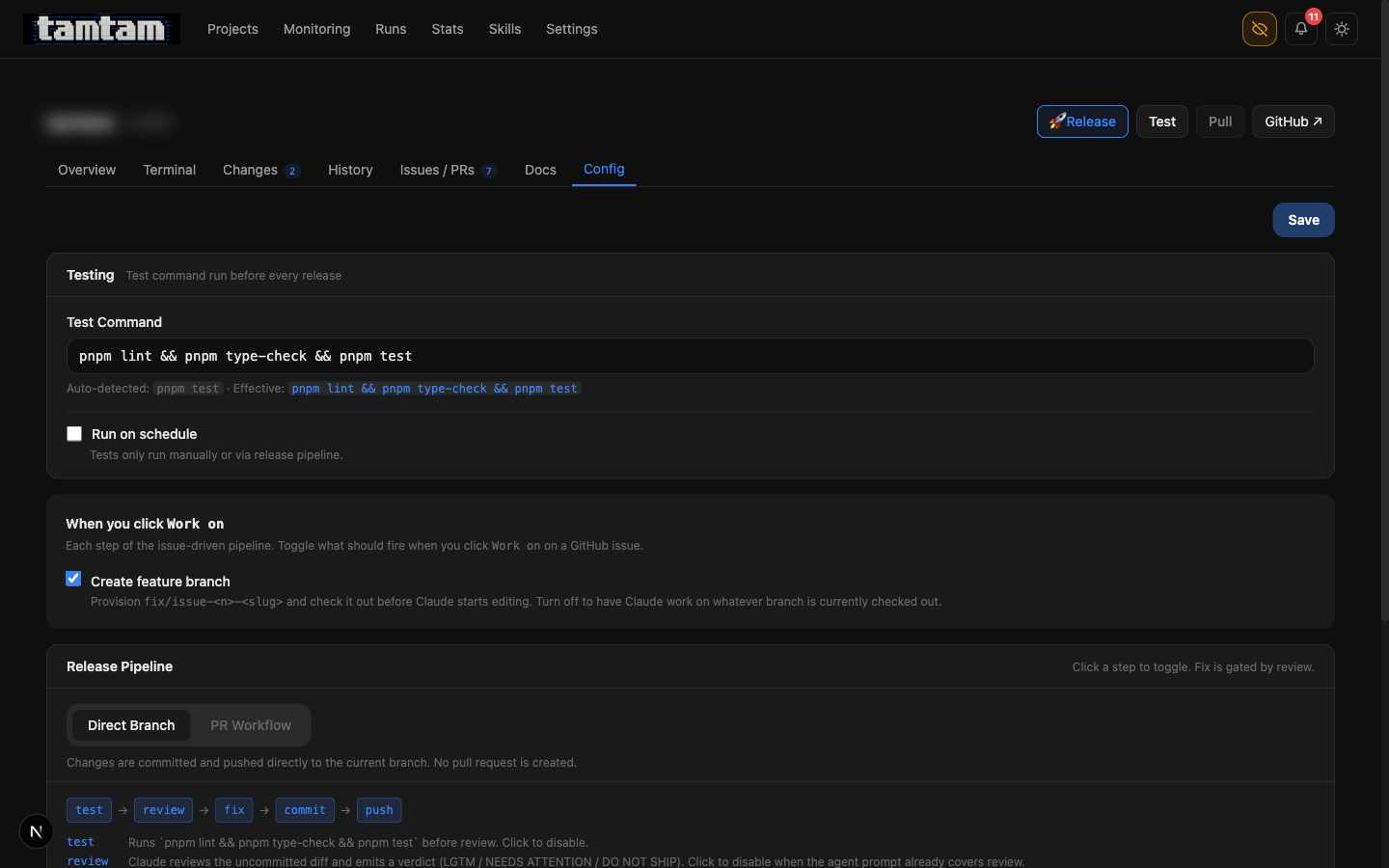 Project Config → Release Pipeline. Toggle between Direct Branch (
test → review → fix → commit → push) and PR Workflow (same, plus dod → merge). Clicking any step in the strip toggles it — e.g. the test step can be disabled if the agent prompt already runs tests. Fix is gated by review: it only fires if the verdict comes back NEEDS ATTENTION or DO NOT SHIP, capped at three iterations per 30-minute window to prevent fix loops from burning tokens.
The new steps are mark-dod and merge:
- mark-dod — after push, Claude re-reads the linked GitHub issue (if the run was issue-driven), re-checks the acceptance-criteria checkboxes against the actual committed code, and ticks the ones it can verify. The verification is grep-and-read based, not “Claude says so” — if Claude can’t find the thing in the code, the box stays unchecked. This is the one step I was most nervous about letting an agent touch, and the rubric ended up being the whole reason it’s safe: “show me where, in which file, on which line”. No file, no check.
- merge — a background poller watches the PR’s CI checks. Once they pass, tamtam merges the PR (squash, via
gh), switches the working copy back tomain, and then firesmark-dodone more time on the merged state so the issue closes cleanly.
The glue for all of this is in lib/start-pr-wait.ts and lib/start-mark-dod.ts. The poller is deliberately dumb: it gh pr checks every ~30s, gives up after an hour, and surfaces a webhook notification on either outcome. No websockets, no GitHub webhooks landing on my laptop, nothing that needs a tunnel. It works because tamtam runs continuously under PM2 and owns its own clock.
The biggest practical effect: I can now point an agent at a GitHub issue, walk away, and come back to either a merged PR and a closed issue, or a webhook telling me something broke. Most days it’s the first one.
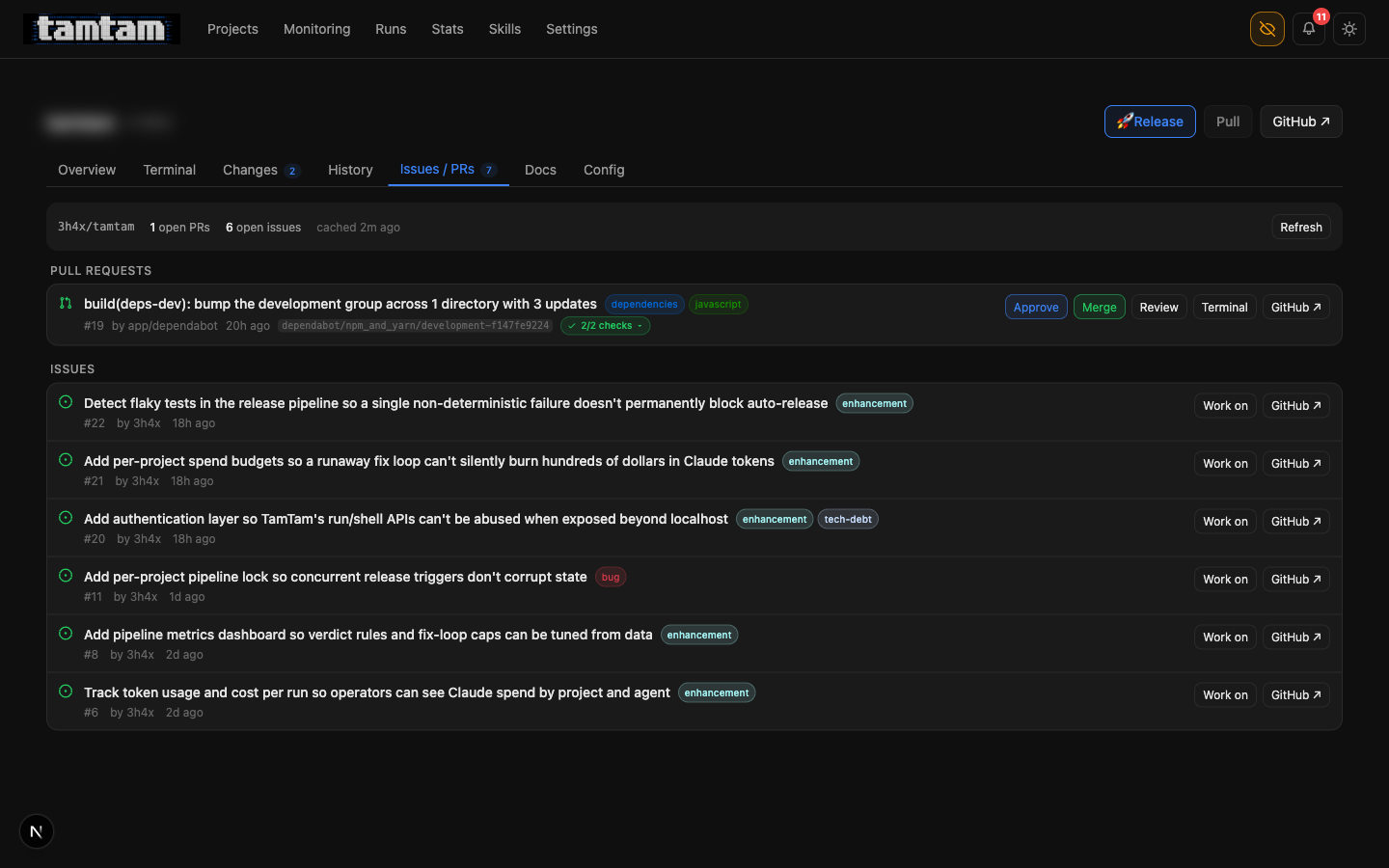 Issues / PRs tab. Dependabot’s dev-deps bump has been reviewed and is one click from merge (
Approve runs the review agent against the diff; Merge actually merges). Below: six issues, each with a Work on button that checks out fix/issue-<n>-<slug>, opens the terminal pre-prompted with the issue body, and wires the pipeline to land its changes on that branch and open a PR linking back to the issue.
Self-improving agents — the prompt is a TEXT column, still
The original post had a paragraph I’ve come back to three or four times since: “There is nothing — not the framework, not the DB, not the process model — stopping an agent from editing that column. So they do.” Five days ago that was mostly metaphor. Now it’s a recommended skill you can tick in the UI:
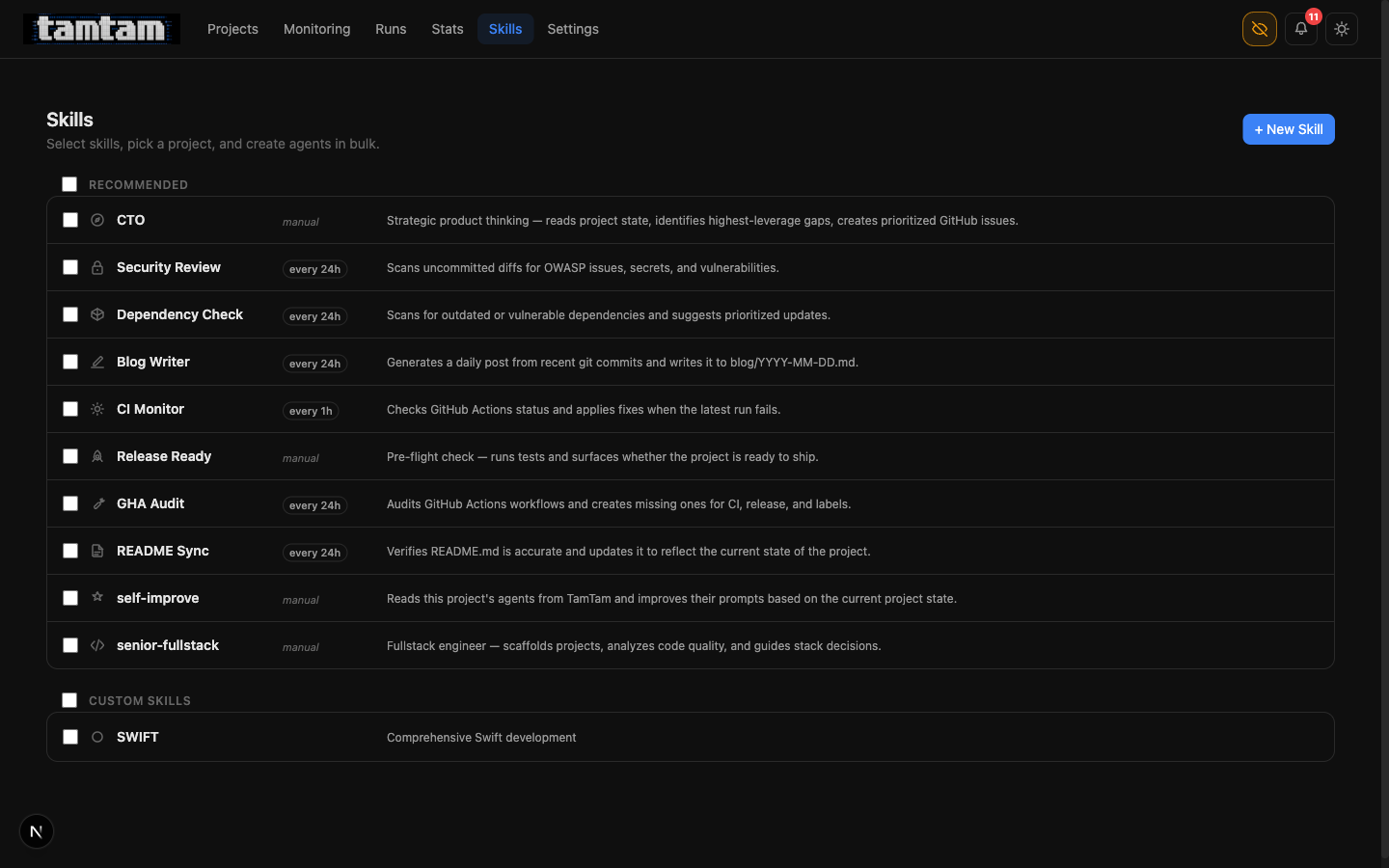 Skills. Everything with a schedule label (
every 24h, every 1h) is set up to fire on its own once it’s attached to a project. The self-improve skill and the CTO skill are both manual — they’re sharp enough that I want to be the one pulling the trigger, for now.
The self-improve skill is small. Conceptually:
You are the tamtam self-improvement agent for project
<X>. Read every agent attached to this project via the tamtam API. For each one, read its last few runs, look at what actually happened, and if the prompt could be clearer, more specific, or less wrong, rewrite it viaPATCH /api/agents/by-name.
The by-name endpoint (/api/agents/by-name) was added specifically so an agent running in project tamtam can update another agent in project tamtam without knowing its UUID. It’s a deliberate crack in the wall. It makes the self-edit loop possible; it also makes it obvious that the wall is made of glass.
What happens in practice is boring and useful: the test agent’s prompt on a Python project gets its pytest -x swapped for the actual command after three runs discover the project uses uv run pytest. The blog agent’s prompt picks up the reminder that it should skip weekend commits on my personal repos. The improve agent’s prompt loses the paragraph about “be polite to the reviewer” once tamtam realises there is no reviewer other than the review agent, who reads the diff and doesn’t care about manners.
I still sanity-check these diffs — every prompt edit shows up as a regular job in the history, and the diff of “what changed” renders as git-style before/after in the agent’s edit screen. Nothing happens invisibly. That’s still the cornerstone of the whole thing.
The CTO skill — a direction-setter, not a code-writer
The failure mode of an agent fleet with nothing else going on is that it starts looking for things to do. That’s not inherently bad — most “improve” runs are small, useful, and I’d probably have done them myself eventually. But I started noticing that the agents were collectively ambitious: if nothing was broken, they’d invent a refactor.
The fix is a skill I’ve called CTO. Its whole job is to fire once, read the codebase like a human would on their first day — README.md, recent commits, open issues, the tests that are slow, the deps that are stale — and then not fix anything. It files prioritised GitHub issues instead. High / medium / low, with rationale. It writes acceptance criteria as checkboxes so mark-dod can verify them later.
CTO skill — system prompt excerpt
---------------------------------
Do NOT edit code. Do NOT open PRs. Your output is a list
of GitHub issues you will create via `gh issue create`.

Criteria for a good issue:
- It names a real user-visible risk, bottleneck, or missing
  capability. "Tech debt" by itself is not a reason.
- It has ≥ 2 checkbox-style acceptance criteria that a
  different agent could verify by reading the code later.
- It has a priority (critical / high / medium / low) and a
  one-sentence justification for that priority.
The issues it’s opened on tamtam itself are the best demo of why this matters. Five days in, I let the CTO skill run once. It filed six issues:
- #22 — Detect flaky tests in the release pipeline so a single non-deterministic failure doesn’t permanently block auto-release (enhancement)
- #21 — Add per-project spend budgets so a runaway fix loop can’t silently burn hundreds of dollars in Claude tokens (enhancement)
- #20 — Add authentication layer so TamTam’s run/shell APIs can’t be abused when exposed beyond localhost (enhancement, tech-debt)
- #11 — Add per-project pipeline lock so concurrent release triggers don’t corrupt state (bug)
- #8 — Add pipeline metrics dashboard so verdict rules and fix-loop caps can be tuned from data (enhancement)
- #6 — Track token usage and cost per run so operators can see Claude spend by project and agent (enhancement)
Not one of those is “fix a typo”. Every one of them names a way the system can actually hurt me. Issue #6 is the reason the stats page exists now. Issue #11 is the reason pipeline_locks is a table. Issue #22 is open on my radar for the next week. The CTO skill earned its keep on its first run by redirecting the entire fleet from “keep writing code” to “go fix these six specific things”. That’s the highest-leverage prompt I’ve written.
Stats — so I know what the fleet costs
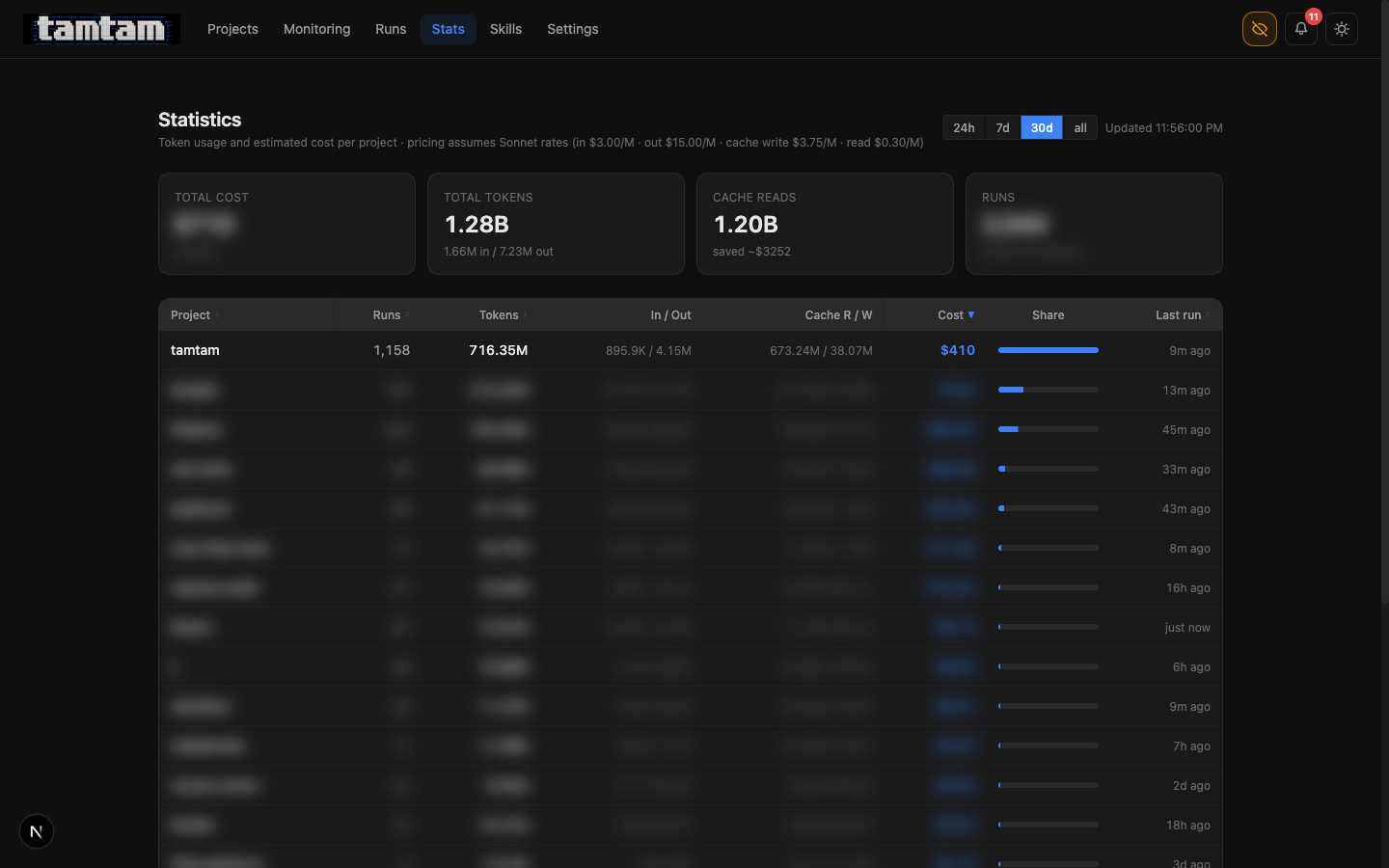 Stats, 30d window. Tamtam itself is the top consumer, obviously — it’s reviewing itself every 24 hours and the loop is hungry. 1.20B of the 1.28B total tokens are cache reads, which is the single most important number on the page: caching saved me roughly $3,252 this month against the Sonnet list price. That’s the only reason the agent fleet is remotely affordable.
This was issue #6 five days ago. The data was already there — Claude’s stream-json output emits usage counts on every message_delta event, and the job log already had them — I just wasn’t surfacing them. The page itself is ~200 lines. The 24h / 7d / 30d / all windows come from a single SQL query with a parameterised started_at >= ? clause and no indexing more clever than a single btree on jobs(started_at).
The unlock isn’t the page. The unlock is that I can now cap things honestly. Issue #21 (per-project spend budgets) is open precisely because, until this existed, I didn’t know whether an agent loop that went wrong would cost me $0.40 or $400. Now I can answer the question, which means I can start defending against the bad answer.
Release runs are finally navigable
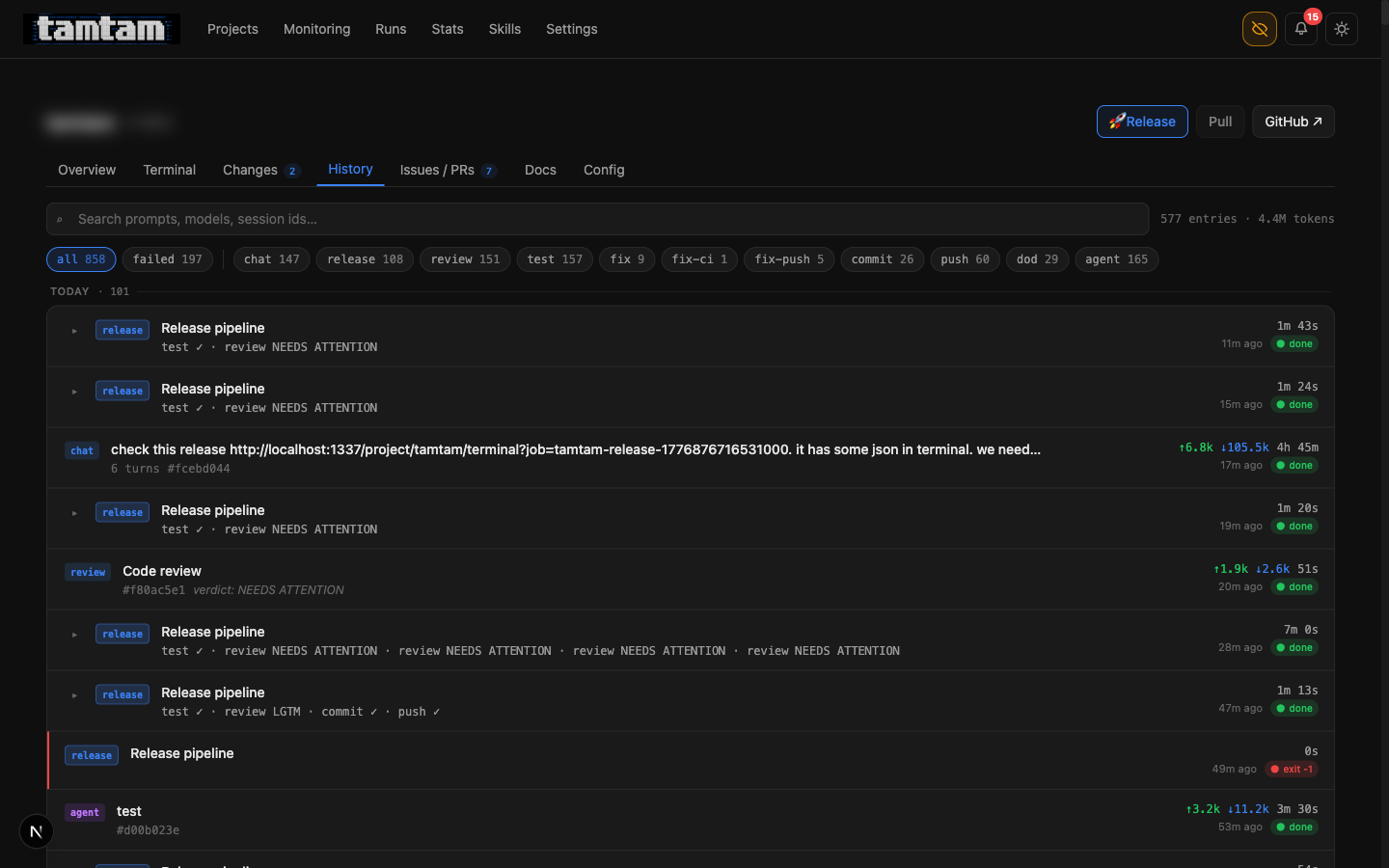 History tab.
 release rows now show the child pipeline steps inline — test ✓ · review NEEDS ATTENTION or test ✓ · review LGTM · commit ✓ · push ✓. Click to expand the full log. The row with four consecutive review NEEDS ATTENTION · review NEEDS ATTENTION · review NEEDS ATTENTION · review NEEDS ATTENTION is the fix loop giving up — the 3-per-30-minute cap means the fourth attempt just records the verdict and stops, which surfaces as a single row I can read in one glance instead of four scattered jobs I have to reconstruct.
The original history page treated every step as a peer job. So a single release that went test, review, fix, review, commit, push was six rows that you had to mentally re-assemble. Not anymore. Runs of kind release are now parents; the steps they triggered are children; expanding the parent shows the whole tree. The data model didn’t change — each step is still a jobs row — it’s just that the query now groups by parent_job_id and the UI renders the tree.
It’s the sort of thing I’d have called a nice-to-have five days ago. In practice it’s made the history page usable again. 577 entries, 4.4M tokens — that’s how much has happened on tamtam alone since the 17th, and without the grouping I’d have given up on this page.
Smaller things that add up
Push-hook auto-fix. If git push fails because of a pre-commit / pre-push hook (lint, typecheck, whatever), tamtam parses the failure, resumes the same Claude session, asks it to fix the specific issue the hook reported, and retries the push. Caps out after three tries. Most of the time this is the loop catching its own sloppy commits before a human ever sees them.
Webhook notifications. Five events — release_success, release_fail, fix_loop_exhausted, review_do_not_ship, agent_run_fail — can now fire Slack blocks, Discord embeds, or generic JSON POSTs. HMAC-signed if a secret is set. This is how tamtam tells me the loop is on fire while I’m in another room.
Log retention + rotation. The PM2 log dir was silently filling my SSD. Fixed. Retention is now configurable.
CTO, GHA-audit, README-sync, self-improve seeded as recommended agent skills. Tick a box, get a working agent. 80% of the value of tamtam, in hindsight, is that the one-click adoption of these prompts is frictionless — I don’t have to think about whether to attach ci-monitor to a new repo, I just do.
A dev-server footgun, documented. The trap I kept falling into: pnpm restart instead of trusting HMR, leaving a zombie next-server on port 1337 serving stale code. Now explicitly written into CLAUDE.md so the next agent that thinks “let me just restart the server” reads the warning first. A CLAUDE.md entry earns its keep the moment it stops one bad action.
Direction — where this is pointing
There are a couple of concrete things I want next, and I’m writing them down because the CTO skill is reading this post too:
Per-project spend budgets (#21). The stats page tells me what I spent. The next thing is “stop” when I spend too much. Simple ceiling per project per day, trip the agent enabled flag when the ceiling is hit, send a notification. This is the first autonomous safety cutoff I actually need.
Flaky test detection (#22). The release pipeline currently treats any test failure as a full-stop. If a test is flaky — fails 1 in 10 — the agent fleet is permanently dead in the water on that project. I want a quorum/retry policy, behind a feature flag per project, with the decision of “is this flaky or genuinely broken?” handed to Claude. Yes, that’s recursive. Yes, it might be the right answer.
Per-project pipeline lock (#11). If two release triggers fire in the same second, state corrupts. There is a pipeline_locks table now. There is no locking logic yet. This is an embarrassing bug that’s nevertheless never hit me in practice, which is why I’ve dragged my feet.
Auth layer (#20). Right now tamtam is localhost-only and that’s fine. The moment I want to run this on a tiny VPS next to a project so the agent fleet keeps going while my laptop is shut, I need real auth on the run/shell APIs. This is the gating thing for the “tamtam but not on my laptop” story, and it’s where single-user-dashboard becomes two-user-dashboard, which is a different product.
Everything else is sanding — better terminal UX, better streaming resilience, a richer commit-message prompt, wire up the stats page to the spend budget once that lands. The big-ticket shape is set: PR-shaped pipelines, self-improving prompts, a CTO that names priorities, cost visibility, notifications that leave the box. Five days got that far. The next five are about tightening the loop around it.
The part I still don’t know how to write about
I am increasingly not the author of the code in tamtam. I’m the author of the prompts that author the code. I review diffs, I decline changes, I rewrite rubrics, I write posts like this one — and I still write plenty of commits by hand — but the fleet is pulling ahead of me on volume. Five days ago 1,192 jobs had run. Tonight the tamtam project alone has 858 jobs on record, 4.4M tokens, 197 failures, 108 releases fired. The code I’m looking at in git blame is more and more often Claude’s and less and less often mine.
I don’t have a tidy framing for how that feels. The tool is better this week than it was last week. The amount of my hands-on time in it has gone down, not up. That’s either the most productive I’ve ever been or a preview of a role I don’t want. I keep telling myself both, and then I look at the history tab and watch the next release pipeline green-tick its way through test → review → commit → push without me touching anything, and I write a post about it instead.
It’s still open source: github.com/3h4x/tamtam. If you ran it a week ago: pull, docker compose up, tick the self-improve and CTO skills on your biggest project, and come back tomorrow. That’s the fastest way to understand what changed.
3h4x